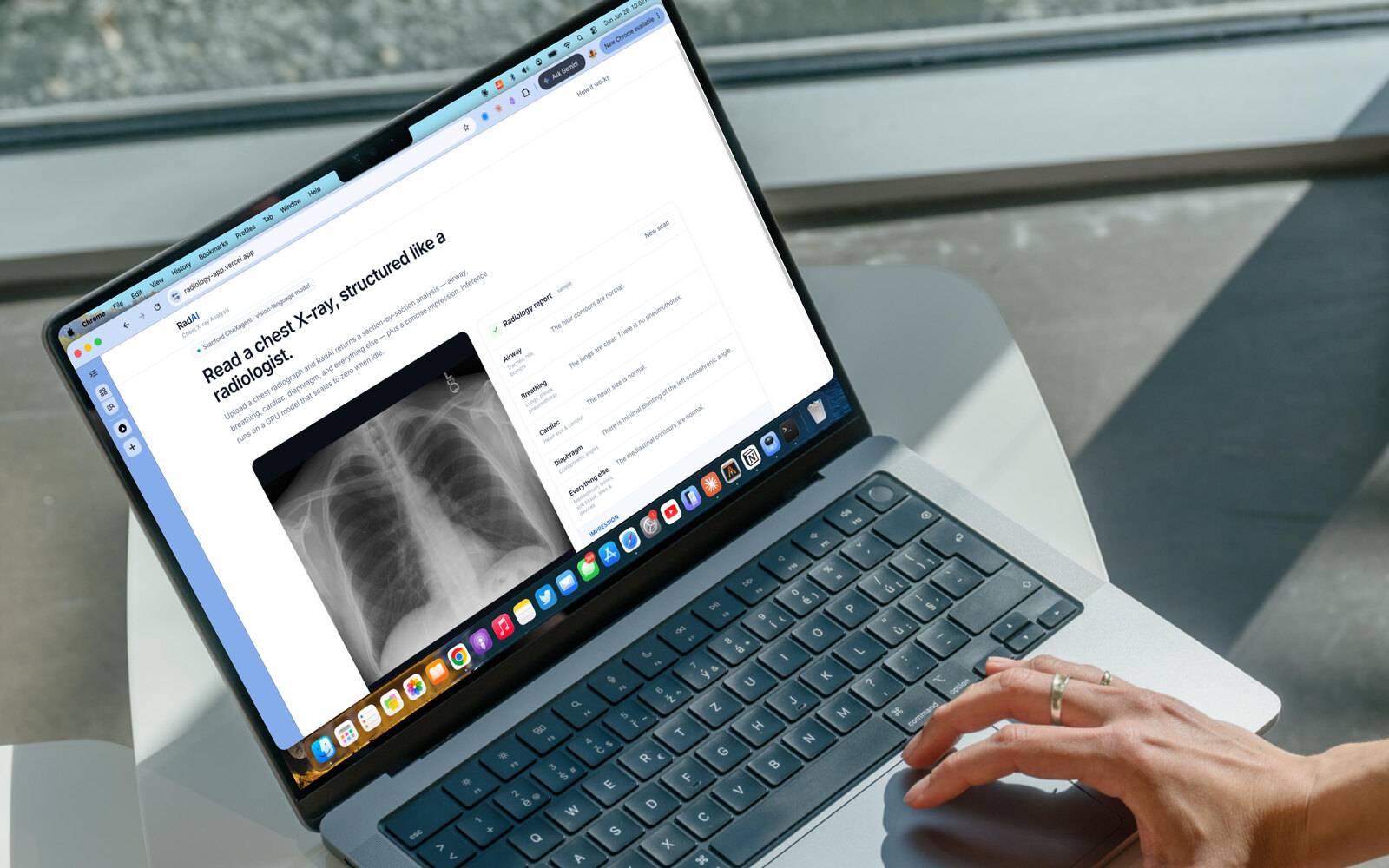
A chest X-ray report has a recognizable shape. A radiologist walks the anatomy, airway, breathing, cardiac, diaphragm, everything else, and ends with an impression. RadAI reproduces that shape automatically: you give it a chest radiograph, and it returns a finding for each region plus a one-line summary, the way a read is actually structured.
The model that makes this possible, CheXagent, a multimodal vision-language model from Stanford AIMI, is not mine. What I built is everything around it: the work of taking a 3-billion-parameter research model and turning it into a product you can actually visit, use, and keep running. That turned out to be the real engineering story.
The brief
I had wired an app to a GPU model before, the naive way: a server running around the clock whether anyone used it or not. So this time the brief was sharper than "make it work." Serve a 3B GPU model elastically, so it wakes on demand and releases the GPU when it goes quiet, sitting behind an interface good enough to ship, without leaking a single credential to the browser. Three real constraints: elastic serving, cold-start, and security.
The model
CheXagent-2 (3B) is a multimodal model trained by Stanford AIMI to read chest X-rays and describe findings in clinical language. RadAI uses it the way a radiologist structures a read: it prompts the model once per anatomical region, then asks it to condense those findings into a single impression. Image in, structured report out. The interesting part is what it takes to run a model this size reliably and on demand.
The hard part: serving a 3B model elastically
A 3B model needs a GPU, and an always-on GPU is the lazy default. The fix is an architecture, not a setting. Instead of a server that runs around the clock, the model lives behind a SageMaker asynchronous endpoint with autoscaling configured down to zero instances:
- Quiet: no running instances, and nothing is held idle.
- A request arrives: it is queued in S3, and a "backlog without capacity" signal tells autoscaling to spin a GPU up from zero.
- It runs: the model loads, generates the report, and writes the result back to S3.
- It goes quiet again: with no backlog, the instance scales back down to zero.
The honest trade-off is the cold start: the first request after a quiet period waits a few minutes while a GPU boots and the 3B model loads. A warm request returns in under a minute. The async-plus-queue design is what makes that wait safe to absorb, no request is dropped while capacity spins up, and the system only holds a GPU exactly as long as there is work for it.
Productionizing research code
Research model code is written to run in a lab, not in a container at 2am. Standing this up was a tight loop of deploy, read the logs, fix, redeploy. The model's vision code reached for libraries that were not in the serving image, so I traced every import to assemble the real dependency set. One library had a version that quietly broke a transitive dependency; pinning it to a known-good release fixed an import that looked impossible on the surface. And because re-shipping a 6 GB model artifact over my home connection for each fix was a non-starter, I moved the repackaging into the cloud: a small job that pulls the artifact, swaps in the corrected code, and writes it back, all inside AWS's network. Iteration went from hours to minutes.
None of this is glamorous. All of it is the difference between "it ran on my machine once" and "it is deployed."
Security, designed in
The earlier version had AWS keys sitting in client-side code. RadAI does all AWS access in server-side routes, so the browser only ever talks to my own endpoints. The deployed app authenticates as a dedicated identity that can do exactly three things, invoke this one endpoint and read and write two S3 prefixes, and nothing else. Every cloud resource is tagged to the project and isolated, so it cannot be confused with anything else in the account.
The product
A capable model is wasted behind a clumsy interface, so I designed RadAI to feel like a calm clinical instrument: pure white, one confident blue, and color used only to mean something. You drag in an X-ray, downscaled in the browser before it ever leaves, or click the bundled sample. Because a cold start can take minutes, the loading state does not pretend: it shows elapsed time and tells you the truth, that the model is waking from idle and the first scan after a quiet period can take a few minutes, with a scan-line passing over the image while it works. The report lands structured like a real read, a row per region with its finding, then the impression in a quiet blue callout.
The UX decision I am happiest with: the bundled sample returns a precomputed report instantly, with no GPU and no wait. A casual visitor clicks once and immediately sees what the tool does; only a real upload pays the cold-start wait. The demo always feels fast, and the capability is genuinely there underneath.
The takeaway
RadAI is the full arc: a research model turned into a deployed product that reads a chest X-ray, structures the result like a radiologist, serves elastically, and exposes no secrets to do it. The model is Stanford's; the serving architecture, the full-stack app, and the product design are mine. It is the path I care about: rigorous serving, honest engineering, and an interface that respects both the user and the subject matter.
What I would explore next
- Smarter cold starts: keeping the model warm during predictable windows, or trimming load time, to soften the first-request wait.
- Confidence and provenance: surfacing how strongly the model committed to each finding, rather than presenting every line with equal certainty.
- A comparison view: placing the AI report beside a reference read to make its strengths and failure modes legible at a glance.
RadAI is a research and educational demonstration of medical vision-language modeling. It produces AI-generated estimates, not a diagnosis, and is not a medical device. The underlying model, CheXagent, was created by Stanford AIMI. Always consult a qualified radiologist or physician.
Live demo: radiology-app.vercel.app